

Do you often find funny clips or useful life hacks while scrolling through your feed? We all do! You probably want to save these great moments to your phone gallery so you can watch them later or share them with friends. But the platform itself does not offer a direct save button for most of these videos.
To keep these videos on your device, we need to use some external downloading tools like FvidGo. With so many tools available on the internet today, how do you pick a reliable one?
Quick tips for choosing a FB downloader
Choosing the right tool is actually quite simple. You only need to look at three main things.
First, speed matters. Nobody wants to wait a long time just to process a 15-second short clip. Second, web-based tools are generally better for casual users. If you do not have to install an app, you save storage space on your phone. You also avoid the security risks of installing unknown software. Third, look for tools without annoying ads. Many free tools are packed with pop-ups that ruin the experience.
Below, we will check out the 7 best and most popular options available in 2026 that meet these needs.
Top 7 Facebook video downloaders in 2026
1. FvidGo - The Best All-in-One Downloader
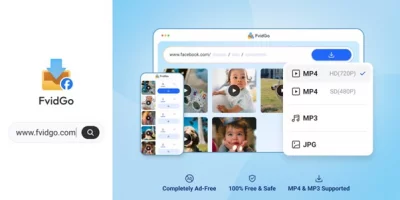
If you want to keep your phone or computer free from random apps, I highly recommend using FvidGo. This is a powerful, all-in-one web tool for Facebook video download. Whether you use a mobile phone, a tablet, or a desktop computer, just open your browser and go to fvidgo.com to start right away.
What makes FvidGo stand out is its amazing versatility. It does not just download regular long videos. It also works perfectly for short Reels, 24-hour Stories, high-quality photos, and even Private videos that you have permission to view. You do not need to register an account, so your privacy stays completely safe. It is a 100% free tool that does not store your data.
When it comes to quality, FvidGo gives you great choices. You can save files in standard definition (SD) or high definition (HD) MP4 formats. Sometimes you might just want the background music from a funny clip or a great speech. In that case, FvidGo lets you easily extract high-quality MP3 audio files directly.
Most importantly, because it is purely a website, the interface is super clean. You will not see any annoying pop-up ads. The success rate for processing links is also incredibly high. If you just want one hassle-free tool for all your saving needs, FvidGo is clearly the top choice right now.
How to Download Videos with FvidGo
After reading about the options, you might be eager to try FvidGo. Do not worry if you are not great with technology. The steps are incredibly simple. It is as easy as copying and pasting text.
- Copy the Link: Open your app or the website and find the video, Reel, or Story you want to save. Click the "Share" button and then select "Copy Link."
- Paste the Link: Open the browser on your phone or computer and type in fvidgo.com. Right in the middle of the homepage, you will see a large input box. Paste the link you just copied into this box.
- One-Click Download: The system will automatically start processing your link. Wait just a few seconds, and you will see a preview of the content. You can pick an HD MP4 video or an MP3 audio file. Click the "Download" button, and the file will safely land right in your phone gallery or computer folder.
Click the "Download" button, and the file will safely land right in your phone gallery or computer folder, making it perfect for Facebook Reels download.
2. SaveFrom.net

Many people who have been on the internet for a while know about SaveFrom.net. This is an older, well-known website that supports many different social media platforms. Its main advantage is strong compatibility. Whether you are using a Windows PC, an Apple Mac, an Android device, or an iPhone, it works great as long as you have a web browser. The process is smooth and very familiar to most users. However, since it is a large and old site, it does show ads on its pages. You just need to be a little careful not to click on the ad links by mistake while you wait for your file.
3. 4K Video Downloader
If you usually work on a computer or you edit a lot of high-quality media, the 4K Video Downloader is a solid option to consider. This is a desktop software program that you need to install on your Windows or Mac machine. Just like its name says, its biggest highlight is supporting extremely high video quality. It easily handles 4K resolution files. But there are downsides. You have to go through the download and installation process. Also, some of its advanced features, like downloading entire playlists or channels at once, require a paid subscription. This might be a bit much for everyday users who just want a quick funny clip.
4. Snaptube
For Android phone users, Snaptube is a highly capable all-in-one app. It is not limited to just one platform. It helps you grab videos, audio, and images from many major social networks. The app has a handy built-in search engine. You can browse content directly inside the app and save it with a single tap. Snaptube does a very professional job with audio extraction and giving you different resolution options. The design is also very user-friendly for mobile users. If you do not mind installing an extra application on your phone, Snaptube is a great companion for your daily entertainment.
5. Hitube

Next up is Hitube (hitube.io), which is a great web tool to keep in your browser bookmarks. It is very similar to FvidGo because it focuses on lightweight, online services. Just paste your link, and it handles the parsing to give you your file. Hitube performs very steadily with standard videos and pictures. The website loads fast and gets the job done quickly. While it might have a bit of room to improve when handling complex short videos or private content, it acts as a perfect backup to FvidGo. If your network is acting up, switching between them works perfectly.
6. SnapSave.app
SnapSave.app is another online site dedicated strictly to this specific platform's content. Its standout feature is its strong ability to process high-definition video links. If you are someone who cares a lot about video clarity, maybe because you want to watch the clips on a large TV screen, using SnapSave to grab 1080P or higher resolution files is a great idea. The layout is easy to understand. But, similar to SaveFrom, it might display some ads while you wait for the file to process. This slightly affects the clean user experience, but it remains a very reliable tool.
7. Video DownloadHelper

The last tool on our list is Video DownloadHelper. This one is quite different from the others. It is not a website, and it is not a standalone mobile app. Instead, it is a browser extension. If you mostly browse the web on a computer, you can install it directly from your browser's extension store. When you play a video on a webpage, the extension icon in the corner lights up. You simply click it to grab the file. This is highly efficient for heavy computer users who save a lot of materials daily. But, of course, this extension will not help you on your mobile phone.
Conclusion
To sum it up, there are plenty of tools today that help us save great online content. If you often need ultra-high-definition files in bulk and prefer using a computer, specialized desktop software is a solid choice. If you like using Android apps, Snaptube is a very versatile pick.
But if you want something ready to use instantly, with absolutely zero ads, no storage space taken up, and full features for videos, pictures, and audio, the web-based FvidGo is undoubtedly the top recommendation for 2026. Next time you spot a funny clip or a great recipe video, just open your browser and give FvidGo a try. It provides the smoothest and easiest experience out there!